
1. 00 For law firms, notaries and tax advisers

    Spoken.
    Written.

    You dictate – Kanzleihelfer.ai turns it into a finished brief, client letter or file note. On your firm’s letterhead, as a Word file, in minutes.

    5 dictations and 20 chat messages free · iPhone, iPad, Android, web

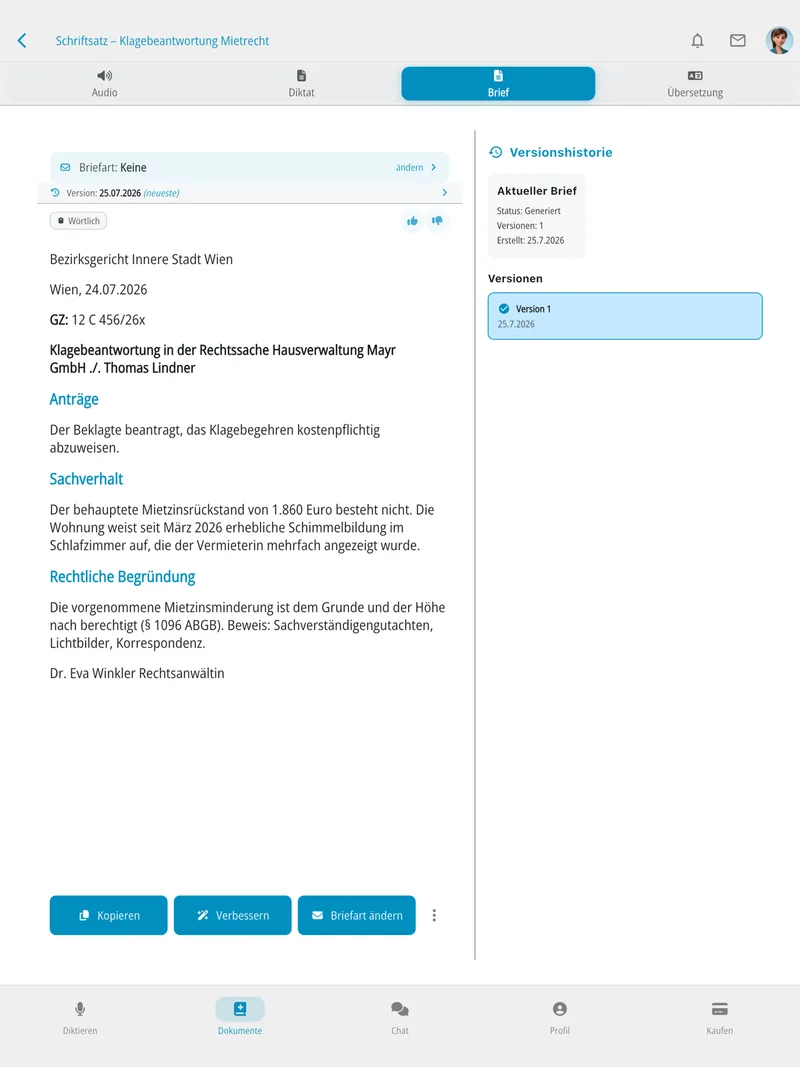
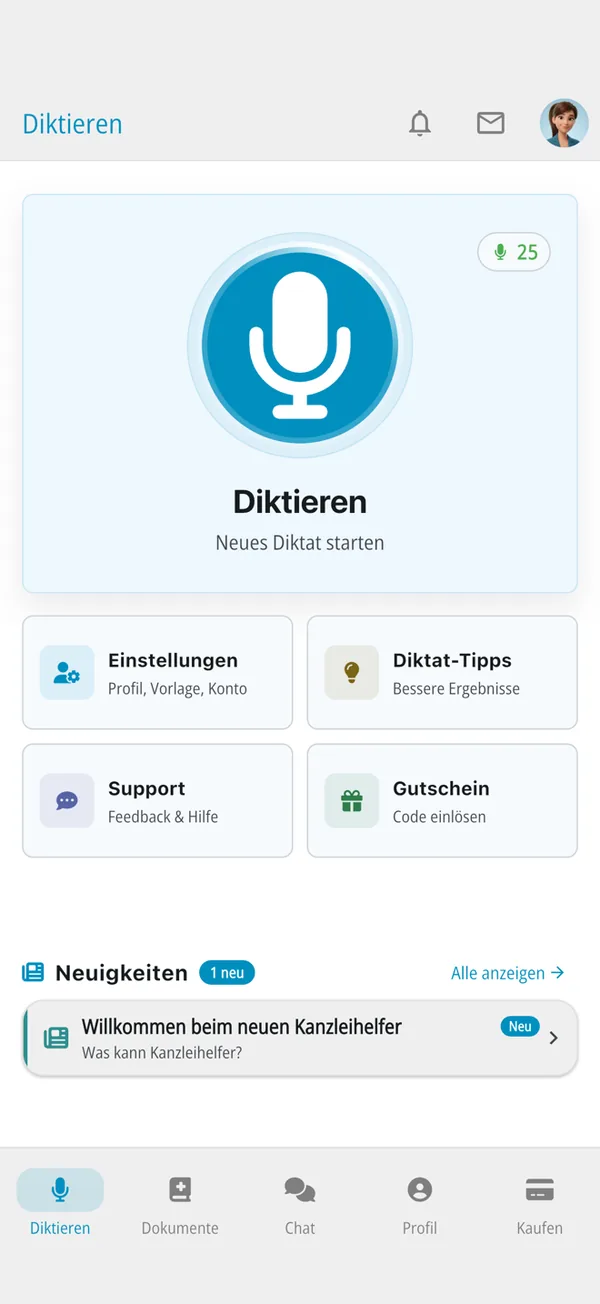
    Kanzleihelfer.ai on the iPad: finished statement of defence with version history Kanzleihelfer.ai app: home screen with dictation button
  2. 01 Dictate

    One tap is enough.

    Tap the dictation button and start talking – on your phone, your tablet or in the browser. No voice training, no voice commands.

    Freely worded. Or word for word.

    Free
    The AI turns your dictation into a structured brief – with salutation, outline and closing.
    Exact
    Verbatim transcription for minutes, expert opinions or court transcripts.
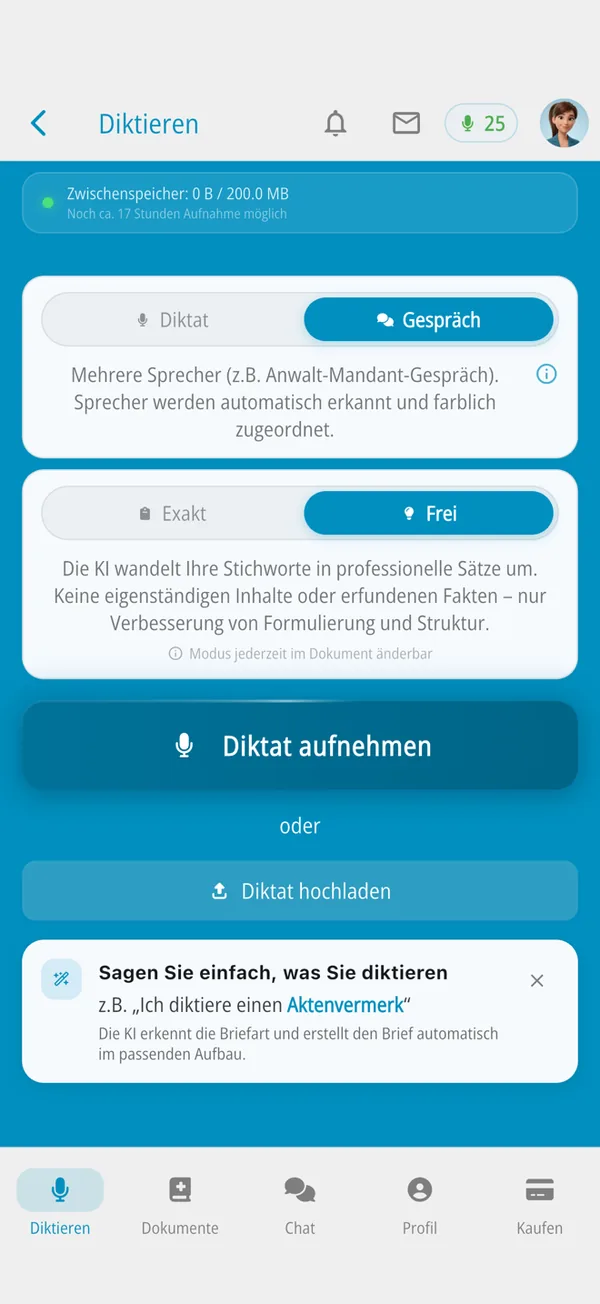
    Choosing the dictation mode in the app: dictation or conversation, exact or free
  3. 02 Recording

    Four hours. One dictation.

    Up to four hours in one go – or upload an existing audio file. No signal in the courthouse? The recording is saved on the device and uploaded as soon as you are back online.

    Raw dictation“Brief to the District Court Inner City, statement of defence, Mayr versus Lindner, uh, we move for dismissal, the arrears of one thousand eight hundred and sixty euros do not exist, full stop, mould in the bedroom since March …”

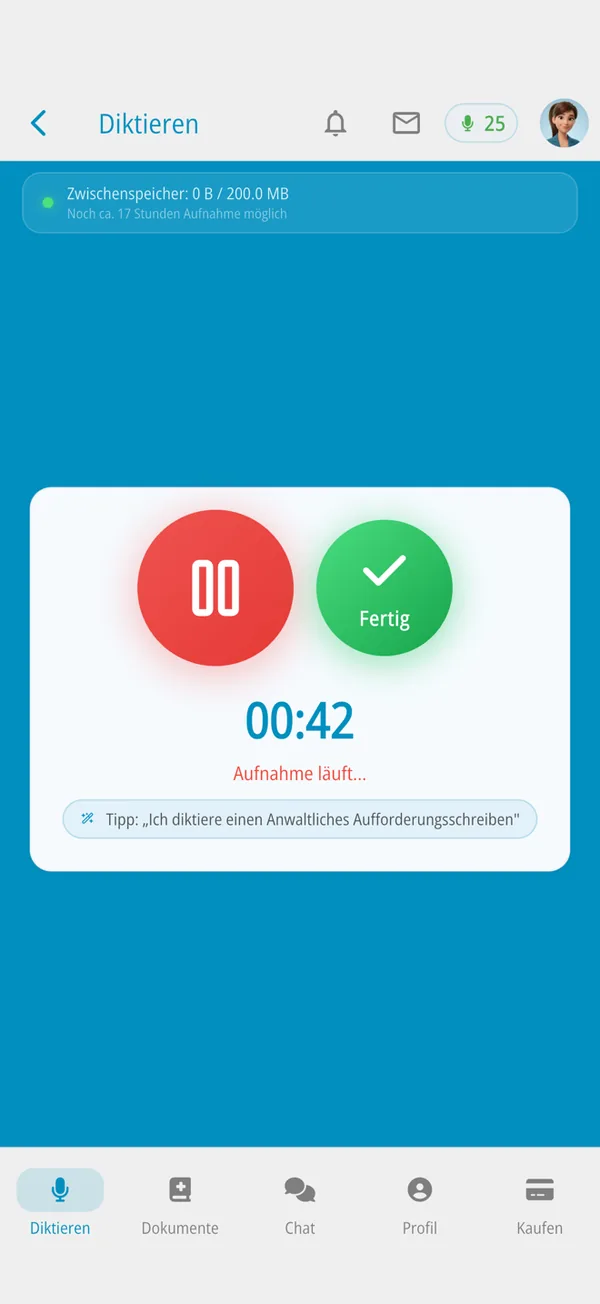
    Recording in progress: timer 00:42, tip “I am dictating a letter before action”
  4. 03 The brief

    Caption, case number and reasoning.

    Kanzleihelfer recognises the letter type and builds the brief in the right structure. Then: improve it, change the letter type, copy it – or export it straight to Word.

    • District Court Inner City Vienna
    • Case 12 C 456/26x
    • Motions
    • Facts
    • § 1096 ABGB
    • Legal reasoning
    • Evidence: photographs
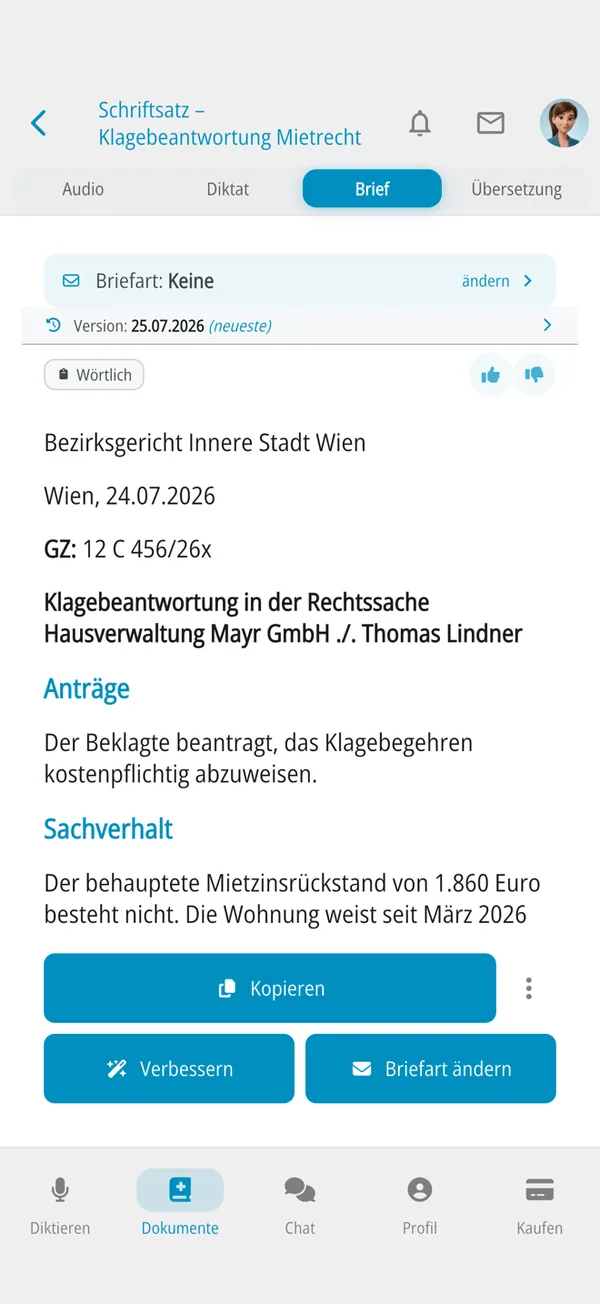
    Finished statement of defence in the app with motions and facts
  5. 04 Letter types

    Fourteen letter types. And your own.

    Letter types define how a dictation becomes a finished letter: structure, style, recognition. Kanzleihelfer derives your own from a sample letter.

    • Client letter
    • Letter before action
    • Legal brief
    • Payment reminder
    • File note
    • Power of attorney
    • Cover letter for a draft deed
    • Notarisation appointment confirmation
    • Escrow letter
    • Cover letter for a land register application
    • Objection/appeal against a tax assessment
    • Request for extension of a deadline
    • Cover letter for annual accounts
    • Statement on a tax audit
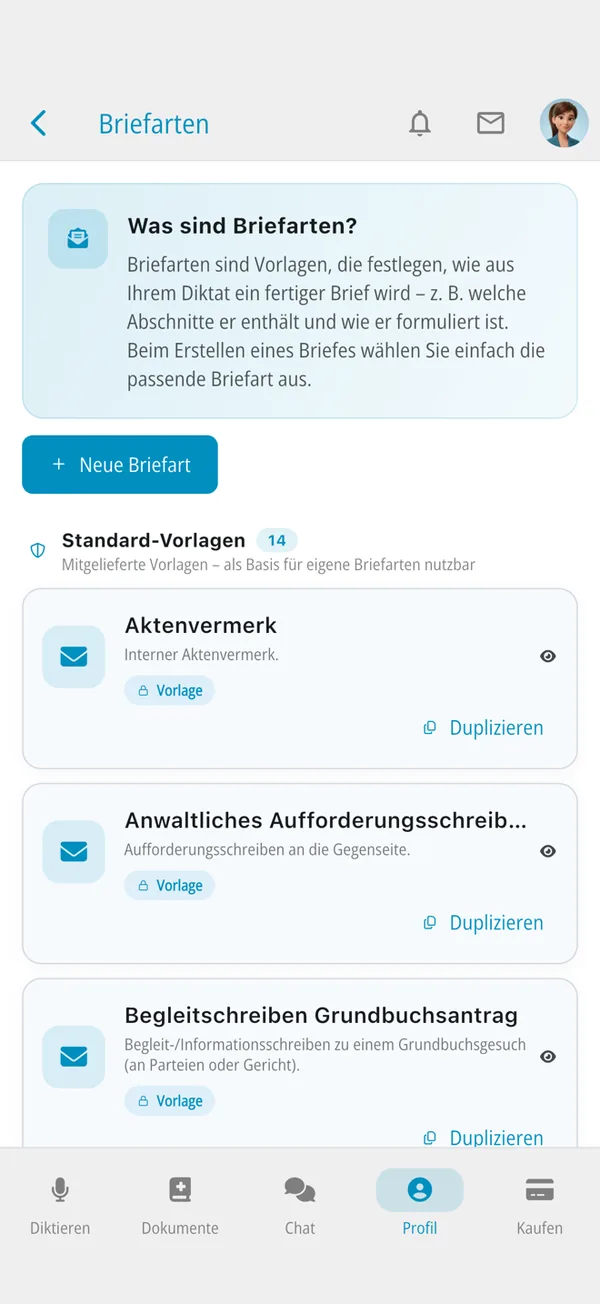
    Letter types in the app: file note, letter before action, land register cover letter
  6. 05 Follow-up

    Ask your document.

    • Chat“Summarise the statement of defence.” Summaries and translation into more than 20 languages.
    • Lexi The assistant knows the app inside out and answers questions about your documents.
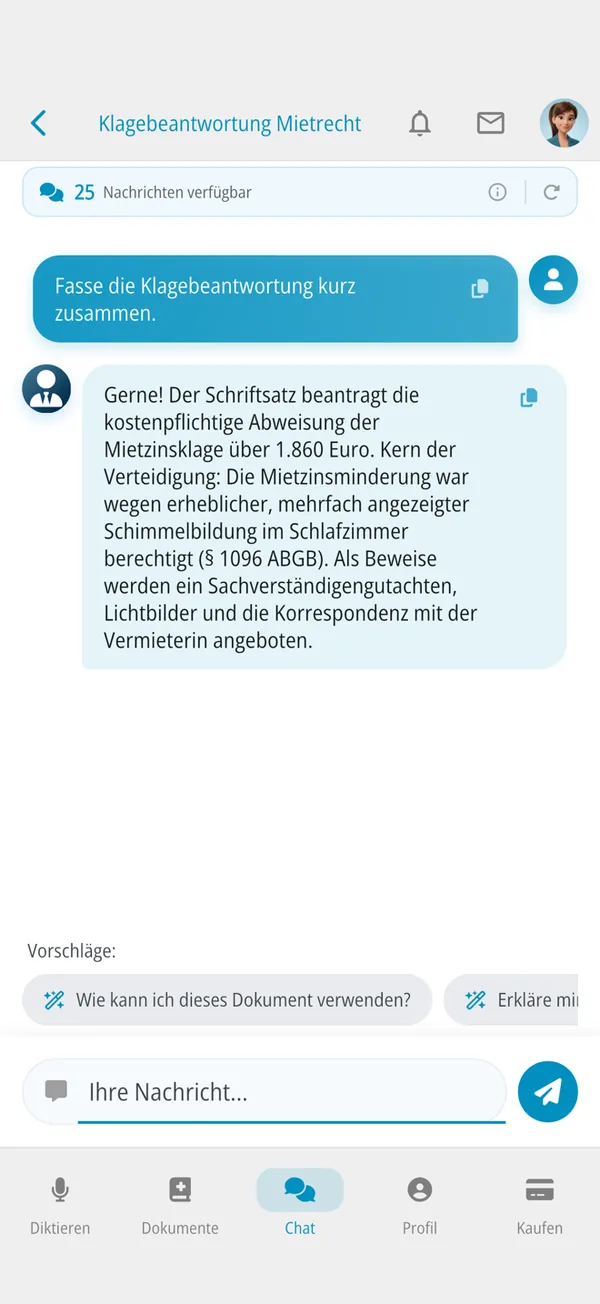
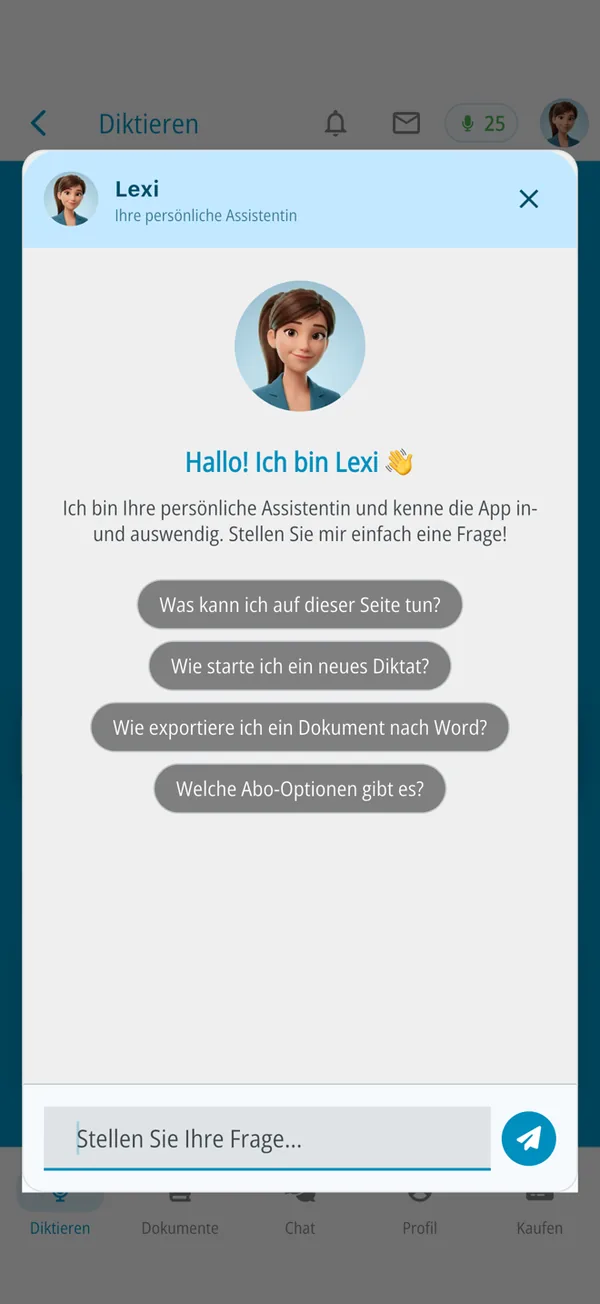
    Document chat about the statement of defence Lexi, the assistant in the app
  7. 06 Letterhead & Word

    Your letterhead. Your Word file.

    Upload your letter template as DOCX – letterhead, layout and font are applied. The same brief on iPhone, iPad, Android and in the browser.

    The same brief on the iPad The same brief on the iPhone
Skip film

Who it’s for

Built for everyday legal work.

Whether it is a brief, an escrow letter or an objection to a tax assessment: you speak the way you always do – the rest becomes a document in the right structure.

  1. Law firm
    Briefs that are already written.
    • Statements of defence, letters before action, client letters from your dictation
    • Caption, case number and outline in the right structure
    • Client meetings with automatic speaker separation
  2. Notary
    Correspondence around the deed.
    • Cover letters for draft deeds and land register applications
    • Notarisation appointment confirmations, escrow letters
  3. Tax adviser
    Answer assessments instead of typing.
    • Objection or appeal against a tax assessment, deadline extension requests
    • Cover letters for annual accounts, statements on tax audits
  4. Firm team
    One firm. One letterhead.
    • Set up your firm as an organisation, invite members, share quotas
    • The same letter types, style guidelines and letterhead for everyone
  5. On the move
    In court, on the train, at the client’s.
    • Recordings are saved on the device and uploaded once you are online
    • iPhone, iPad, Android and web app – dictate on the phone, continue at your desk

How it works

Three steps. No training.

  1. 1

    Dictate

    On your phone, tablet or in the browser. Up to 4 hours in one go – or upload an existing audio file.

  2. 2

    Kanzleihelfer writes

    Recognises the letter type and builds the letter in the right structure, such as motions, facts and legal reasoning.

  3. 3

    Review & export

    “Improve”, “Change letter type”, copy – or export as a Word file on your own letterhead.

Tip from the app: just say what you are dictating – “I am dictating a letter before action”.

Features

More than speech recognition.

Client meeting · from the Standard plan

Client meetings, cleanly separated.

Record the meeting with your client. Several speakers are recognised automatically and marked in different colours – the basis for a file note or client letter.

Transcript · demo data00:03:18

Sprecher 1 Seit wann zeigt sich der Schimmel im Schlafzimmer?

Sprecher 2 Seit März. Ich habe es der Hausverwaltung mehrmals gemeldet, schriftlich und telefonisch.

Sprecher 1 Haben Sie Fotos und die Korrespondenz?

Sprecher 2 Ja, beides. Die Mails habe ich ausgedruckt.

Letterhead & Word

Your letterhead. Not ours.

Upload your firm’s letter template as DOCX. Letterhead, layout and font are applied, and the export is a Word file. Add your area of law and style guidelines: preferred wording, abbreviations and formatting rules – firm-wide if you like.

Ihr BriefkopfWien, 24.07.2026
GZ: 12 C 456/26x

Bezirksgericht Innere Stadt Wien

Klagebeantwortung in der Rechtssache Hausverwaltung Mayr GmbH ./. Thomas Lindner

Anträge

Der Beklagte beantragt, das Klagebegehren kostenpflichtig abzuweisen.

Sachverhalt

Der behauptete Mietzinsrückstand von 1.860 Euro besteht nicht. Die Wohnung weist seit März 2026 erhebliche, mehrfach angezeigte Schimmelbildung im Schlafzimmer auf …

Klagebeantwortung.docx
Lexi
Built-in AI assistant: answers questions about the app and your documents.
Document chat
Questions to the brief, summaries, translation into more than 20 languages.
Versions
Version history for every letter, audio archive for every dictation.
Offline
Recordings are saved on the device and only uploaded over a stable connection. No dictation gets lost.
For teams
Set up your firm as an organisation, invite members, share quotas – with the same letter types and the same letterhead.

Benefits

Why Kanzleihelfer.ai?

Nine reasons that count in everyday legal work.

  1. No training

    Dictate, pick the letter type or let it be recognised – done.

  2. Letter type recognised

    Kanzleihelfer recognises what you are dictating and picks the right structure.

  3. Your own letter types

    Derived from a sample letter of your firm – with your structure and your style.

  4. Long dictations

    Up to four hours in one go, or upload an existing audio file.

  5. Two modes

    Freely worded as a brief – or exact, word for word, for minutes.

  6. Multilingual

    Summaries and translation into more than 20 languages.

  7. Everywhere

    iPhone, iPad, Android and web app. Sign in with Google, Apple, Microsoft or e-mail.

  8. Traceable

    Version history for every letter, audio archive for every dictation.

  9. Your data location

    Europe (Frankfurt) or Switzerland (Zurich) – your choice.

What you can rely on.

Encrypted
Your dictations and documents are transmitted encrypted.
No sharing
Your content is not passed on to third parties.
Cancel monthly
Monthly subscription, managed via the App Store, Play Store or the web app.

Gallery

See Kanzleihelfer.ai in action.

Eight screens from the app (in German), from dictation to the finished brief. Click to enlarge.

  1. 01

    Dictate

    One tap starts the recording

  2. 02

    Choose a mode

    Dictation or conversation, free or exact

  3. 03

    Recording

    Up to four hours in one go

  4. 04

    The brief

    In the right structure, ready to edit

  5. 05

    Letter types

    Fourteen included, add your own

  6. 06

    Document chat

    Ask, summarise, translate

  7. 07

    Lexi

    The assistant knows the app

  8. 08

    Documents

    All letters in one place

Pricing

Monthly. Clear.

Start free with 5 dictations and 20 chat messages. Then pick the plan that fits your dictation volume.

Starter

19€ / month

Unlimited dictation – up to 15 minutes per dictation.

Dictations
Unlimited
Length
Up to 15 minutes per dictation
Meetings
No conversation mode
Chat
50 messages / month
Platform
Web and Android1
Try it free

Standard With meetings

49€ / month2

Unlimited dictations up to 4 hours, including client meetings.

Dictations
Unlimited
Length
Up to 4 hours per dictation
Meetings
Client meetings (multiple speakers)
Chat
200 messages / month
Try it free

Pro

99€ / month

All features, including client meetings and premium support.

Dictations
Unlimited
Length
Up to 4 hours per dictation
Meetings
Client meetings (multiple speakers)
Chat
1,000 messages / month
Support
Premium support, priority handling
Try it free

Free

€0 – to try it out

  • 5 dictations per month
  • 20 chat messages per month
  • AI-assisted document creation on iPhone, iPad, Android and the web
Start free

Monthly subscription that renews automatically by one month; cancelled and managed via the App Store, Play Store or in the web app (web payments by card via Stripe). Chat messages reset every month. More quota for the whole firm is available through an organisation – talk to us.
1 Starter is available on the web and on Android, and in the App Store once Apple has approved it. 2 In the App Store, Standard costs €49.99 / month.

Time-savings calculator

What your time is worth.

An example calculation: enter your firm’s figures and see how many hours and how much money you free up per year – after subscription costs.

Country
Plan
Assumptions – please adjust to your firm

The hourly rate is an example value (Austria and Germany €150, Switzerland CHF 220). Enter your own.

Example calculation

–

Annual savings after subscription costs

Time saved
–
Value of the time saved
–
Subscription costs
–

Calculation: documents × working days × people × minutes saved, valued at your hourly rate. Subscription costs = plan price × 12 × people. No guarantee.

Try it free

Data protection & data location

You choose where your files live.

Client confidentiality deserves more than a GDPR logo in the footer. What matters is where and how data is processed.

EU FRA · 50.11° N 8.68° E

EuropeFrankfurt

Data location in Germany, processed under the GDPR.

CH ZRH · 47.37° N 8.54° E

SwitzerlandZurich

Data location in Switzerland, under the Swiss Data Protection Act (FADP).

Location
You decide where your data is stored: Europe (Frankfurt) or Switzerland (Zurich).
Transmission
Encrypted – even when the recording is first saved on the device.
Sharing
No sharing with third parties.
Sign-in
With Google, Apple, Microsoft or e-mail.

Frequently asked questions

Briefly answered.

Your question is not listed? Write to info@kanzleihelfer.ai.

What is Kanzleihelfer.ai?

Kanzleihelfer.ai turns your dictation into a finished brief, client letter or file note – on your firm’s letterhead, as a Word file. For law firms, notaries and tax advisers, as an app for iPhone, iPad and Android and in the browser.

Do I need training?

No. Dictate, pick the letter type or let it be recognised – done.

Where is my data stored?

You choose: Europe (Frankfurt, GDPR) or Switzerland (Zurich, FADP). Transmission is encrypted, and nothing is passed on to third parties.

Does it work with our letterhead?

Yes. Upload your letter template as DOCX; the export is a Word file with your letterhead, layout and font.

Which letter types are available?

Fourteen are included, among them legal brief, client letter, file note, escrow letter and objection to a tax assessment. Kanzleihelfer derives your own letter type from a sample letter of your firm.

What if I have no signal in court or on the train?

The recording is saved on the device and uploaded later, once the connection is stable.

Can I record meetings with clients?

Yes, from the Standard plan. Several speakers are recognised and separated automatically.

How much does Kanzleihelfer.ai cost?

Free €0 (5 dictations and 20 chat messages per month), Starter €19 per month (unlimited dictation, up to 15 minutes per dictation, 50 chat messages), Standard €49 (dictations up to 4 hours, client meetings, 200 chat messages; €49.99 in the App Store) and Pro €99 (all features, premium support, 1,000 chat messages). Monthly subscription, cancellable monthly.

Can I cancel at any time?

It is a monthly subscription. It is managed via the App Store, the Play Store or in the web app.

How do I become a partner?

Via the contact form on this page or by e-mail to info@kanzleihelfer.ai. Partners receive 20 % commission on all sales – for good, not just once – plus sales training and sales materials.

Partner programme

Become a partner.

You know firms that spend too much time on paperwork? Help them switch to dictation with AI – and earn from every customer for good.

20 %commission on all sales – not once, but for every customer for good.

Training
Sales training with courses and personal support.
Material
Sales materials for your conversations with firms.

Contact

Write to us.

Questions about pricing, setting it up for your firm or the partner programme? We usually reply within one working day.

Prefer e-mail: info@kanzleihelfer.ai

Try it

Type less.
Advise more.

Your next dictation is the best test. 5 dictations and 20 chat messages free.

Download on the App Store Get it on Google Play